Introducing the MCP Security Proxy: control what AI agents do in your third-party apps through MCP
Today Obsidian is introducing the MCP Security Proxy, a new enforcement point in Obsidian AI Agent Security for AI agents that work in third-party apps through MCP. The proxy gives each MCP connection a governed endpoint that knows the person and app tenant behind each agent session, holds the app's access token in place of the AI client, and checks each tool call with the Obsidian Runtime Policy Decision Engine before it reaches the app.

Risky MCP tool calls run before anyone can review them
MCP lets employees connect an AI agent to Salesforce, Snowflake, Slack, or Google Drive in minutes, without a security review. The agent then acts with that person's access, and each tool call completes in seconds. A finding reviewed the next morning arrives after the damage is done:
- Sensitive data leaves. An agent sends customer records to an outside address through an MCP tool no one reviewed.
- Records are destroyed. An agent calls a delete tool on records that cannot be recovered.
- A leaked token keeps working. An app token copied from a client configuration file gives whoever holds it the same access to the app as the person who created it.
Security teams are left with two poor options. Blocking MCP pushes employees toward unapproved tools and slows the AI adoption the business asked for. Allowing direct connections means accepting tool calls no one checks and tokens no one controls.
Direct MCP connections bypass security's controls
On a direct connection, the AI client talks straight to the app vendor's MCP server, and three things fall outside the security team's controls:
- The agent can call any tool the vendor's MCP server offers. That includes tools that delete records, export data, or post to external channels, and nothing applies your organization's policy to the call.
- The person and tenant behind the request are hidden. To security, an MCP request looks like any valid session, with no record of who started it or which Salesforce org or Slack workspace it reached. When an incident involves an agent, the investigation starts from nothing.
- The app's access token sits in the AI client. It lives in a configuration file on a laptop or in an agent platform, outside the controls security manages.
MCP adoption is outpacing its controls
Atlassian, Notion, Salesforce, Slack, Snowflake, and other app vendors now publish MCP servers for their products, and analysts expect agents to spread faster than the controls around them:
- 40% of enterprise applications will include task-specific AI agents by the end of 2026, up from less than 5% in 2025, according to Gartner.
- More than 40% of agentic AI projects will be canceled by the end of 2027, Gartner predicts, citing escalating costs, unclear business value, and inadequate risk controls.
Meet the Obsidian MCP Security Proxy
The MCP Security Proxy is a governed checkpoint between AI agents and your third-party apps. In place of the vendor's MCP URL, an admin gives users an Obsidian-governed endpoint for each app. Employees keep the AI tools they chose, and the proxy asks the Policy Decision Engine whether each tool call is allowed before forwarding it to the app. When the proxy blocks a call, the agent shows the person a message your security team wrote explaining why it stopped and who to contact.
The Policy Decision Engine holds your organization's agent policies and decides what each agent can do in your third-party apps, using who the agent acts for, their account in the app, and the context in the Obsidian Knowledge Graph. The proxy is one of four enforcement points that apply those decisions, covering agents that reach apps through MCP. Coding agents, agent platforms, and your own gateways get decisions from the same set of policies through their own enforcement points, so security manages agent policy in one console.
The proxy builds on the discovery and governance capabilities Obsidian shipped in August. Discovery finds AI agents, and governance narrows their access and blocks unsanctioned MCP servers. The MCP Security Proxy controls what agents do through the MCP connections your organization approves.
How the proxy decides each tool call
Each tool call through the proxy follows four steps:
- Connect. Each person signs in through the vendor's consent flow. The proxy maps the session to their app account and tenant and holds the app's token, and the AI client receives a proxy-issued token.
- Check. When an agent calls a tool, the proxy pauses the call and sends it to the Policy Decision Engine.
- Decide. The Policy Decision Engine evaluates your policies with Obsidian Knowledge Graph context and returns allow or block, with a reason.
- Enforce. Allowed calls continue to the app. Blocked calls stop at the proxy, and the agent shows the user your policy message. Each request is recorded with the person, the app, and the tenant it reached.
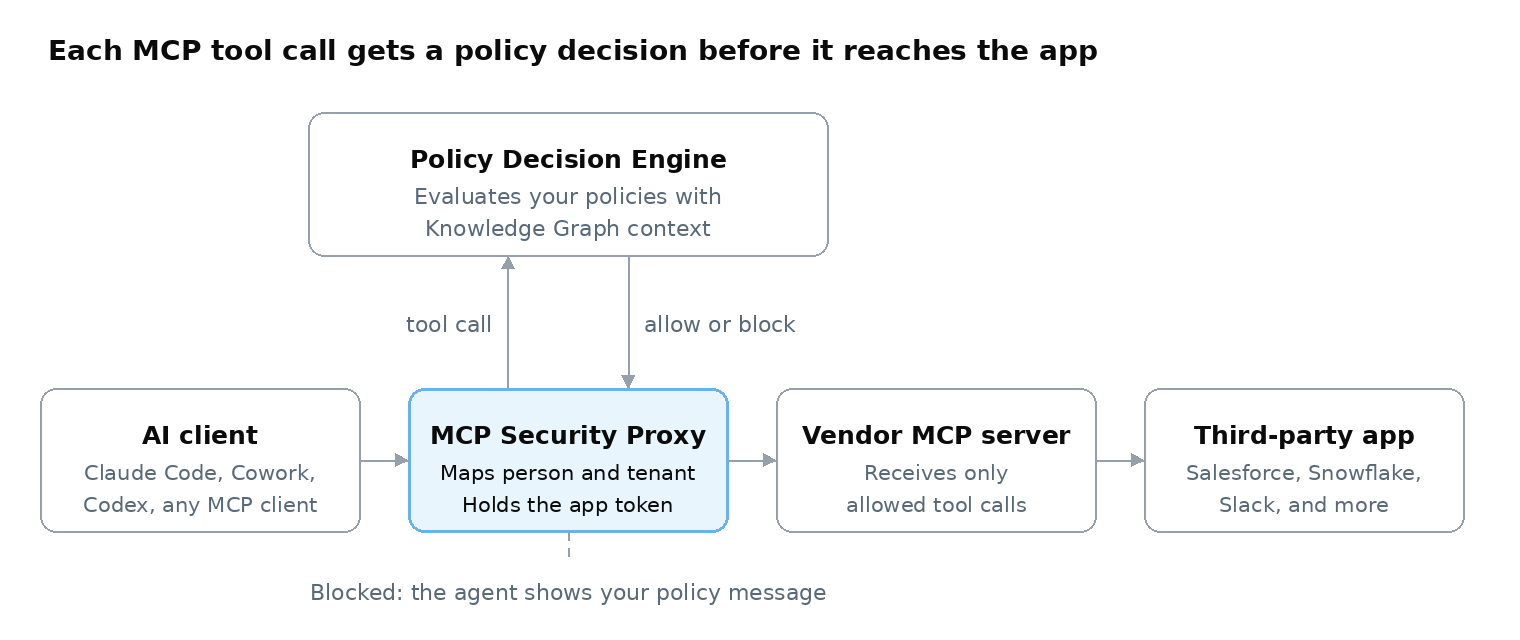
The proxy checks a tool when an agent calls it. It does not hide tools from the AI client's tool list, so a disallowed tool still appears there until the proxy blocks the call. Governed endpoint URLs use an opaque route ID that reveals no customer, tenant, or app details.
Supported apps, AI clients, and gateways
Any AI client that connects to MCP servers can use the proxy, and Obsidian has tested Claude Code, Cowork, and Codex. Supported apps at launch are Atlassian, Context7, Databricks, GitLab, Google Drive, Notion, Salesforce, Sentry, Slack, and Snowflake, with more to come.
Teams that already run an MCP gateway can keep it. The gateway can request the same decisions from the Policy Decision Engine through the Policy Decision API, and the proxy is there for apps where you want Obsidian to host the governed endpoint. Obsidian also works with the Cloudflare MCP Server Portal to apply context-aware policies to AI agent access into third-party apps through the MCP Security Proxy.
Third-party app context tells the proxy who is acting and where
An agent can use a valid token, call a tool the vendor offers, and take an action the user's account is allowed to take, and still put the business at risk. Judging that call takes knowing the person behind the agent, their account in the app, and what they can do there.
Obsidian's foundation has always been third-party apps. Through connectors into more than 200 of them, Obsidian understands how each app's data is structured and accessed, who can access what, and what they can do with that access. The proxy uses that knowledge to match each MCP session to the app accounts Obsidian already monitors, and the Policy Decision Engine draws on the Obsidian Knowledge Graph when it decides. Each example below depends on a fact a direct connection does not carry:
Your existing controls stay in place. Each one does part of the job, and the proxy adds a decision on each tool call:
Talk to us about securing agent risk
See how the MCP Security Proxy uses what Obsidian knows about the person, the app account, and the tenant to decide each agent tool call before it reaches your third-party apps.